Videography app for iPhone that shoots log and RAW video
Log Cam: RAW 4K Video Camera is a videography app for iPhone that builds its log picture from the sensor's RAW data, frame by frame, instead of starting from video the iPhone has already processed. That leaves more in the footage for the grade. Exposure, color and focus are set by hand, and each clip saves as ProRes or HEVC in 4K.
Log and RAW video with seven log profiles
Log video is recorded with a logarithmic curve that keeps more of the highlight and shadow range than standard video. On screen it looks flat and desaturated, because it is made to be graded in an editing app afterward.1
Apple's own camera records Apple Log from a picture the iPhone has already processed, and it needs an iPhone 15 Pro or later. Log Cam takes the sensor's 14-bit RAW Bayer data for every frame, handles the demosaicing, noise reduction and log curve in the app, and then saves the clip as ProRes or HEVC. Because the app makes the curve, all seven profiles work on any iPhone that runs it, an iPhone 12, 13 or 14 included.2
The seven profiles and the cameras they match
- Apple Log and Apple Log 2: Apple's curves, the natural pick for a first log clip
- S-Log3: the curve Sony cameras use
- Log-C3: the curve ARRI cameras use
- V-Log: the curve Panasonic cameras use
- F-Log and F-Log2: the curves Fujifilm cameras use
Matching the curve matters when an iPhone clip has to cut with footage from a dedicated camera. A clip recorded in S-Log3 starts from the same curve a Sony clip does, which gives you a common starting point for matching the two in the grade.
ProRes or HEVC, both in 4K
Every clip records in 4K, either as ProRes, Apple's editing codec, or as 10-bit HEVC for smaller files, and you set the bitrate with presets from 30 to 500 Mbps. ProRes keeps more color information and compresses the picture less than the video a phone usually records, which is what you want under a heavy grade.3
ProRes comes as 422 HQ, 422 or 422 LT. HQ is the fullest and LT the lightest. Use HQ when the grade comes first and you have the storage. For a long shoot on the phone's own storage, use HEVC, in 4:4:4 or 4:2:0. You can also record straight to an external SSD.
You can record at 23.976, 24, 25, 29.97 or 30 fps, including the NTSC rates an editor expects. Match the project's rate, and the clip sits beside your main camera's footage with no conversion.
Log Cam matches its settings to your iPhone, taking lens, crop, frame rate and codec together, so every option it shows is one that phone can record. On an older model that cannot hold 30 fps, 25 fps is the top rate offered.
Manual ISO, shutter, white balance and focus
ISO, shutter and white balance in Kelvin are all set by hand. You can set focus by hand, tap the subject to focus, or leave autofocus on. The camera screen shows all four as the EXP, SHUTTER, FOCUS and WB readouts.
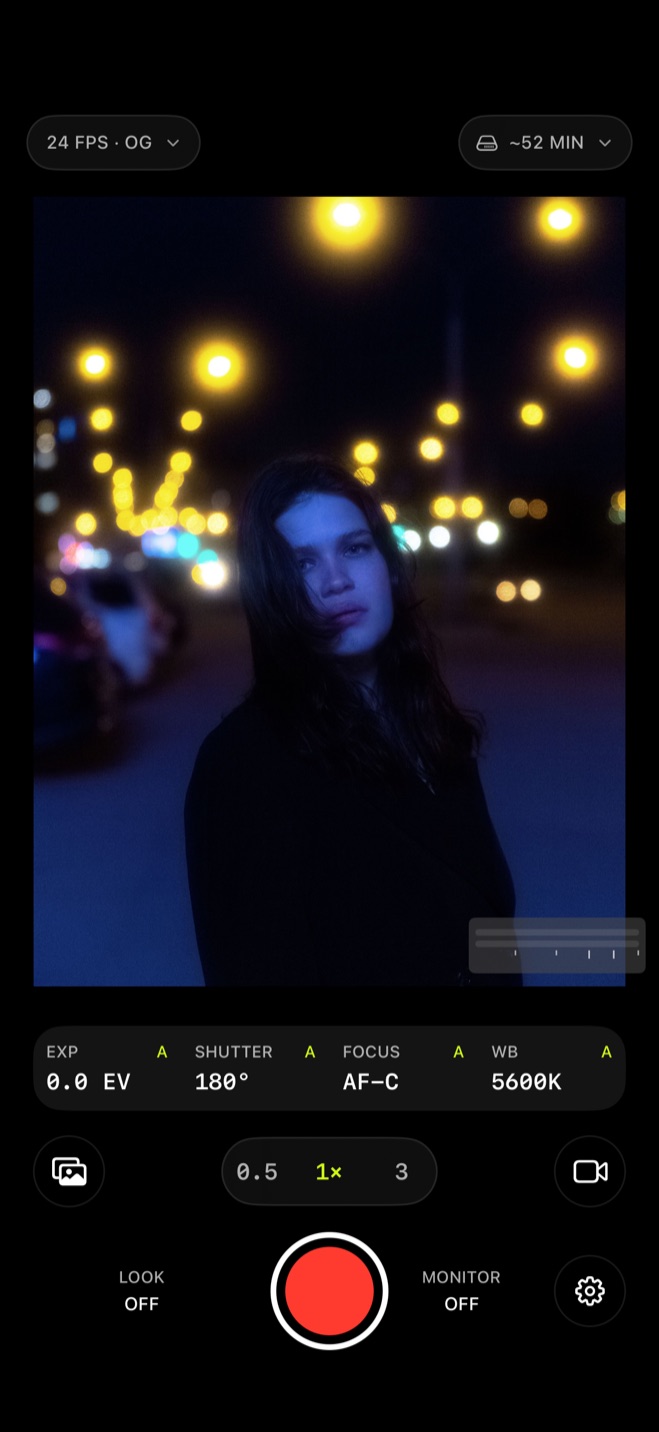
Locking white balance in Kelvin keeps every shot in a scene at the same color temperature, so the clips match before any grading starts.
Focus, ISO and shutter can also change while recording, so you can pull focus to a moving subject or ride exposure as the light shifts mid-take. Turn on "Adjust while recording" in Settings.
Lens choice is on the same screen: the 0.5, 1× and 3 row picks the ultra wide, wide or telephoto camera. Each is a real lens with its own sensor, so the framing changes without cropping into the picture.
Exposing log with zebras, false color and a histogram
Because a log curve spreads highlights and shadows across the whole range, the log picture looks gray and low in contrast on screen, and your eye becomes a poor judge of exposure. A frame that looks dull may be exposed well, and a highlight that looks fine may already be past saving.1
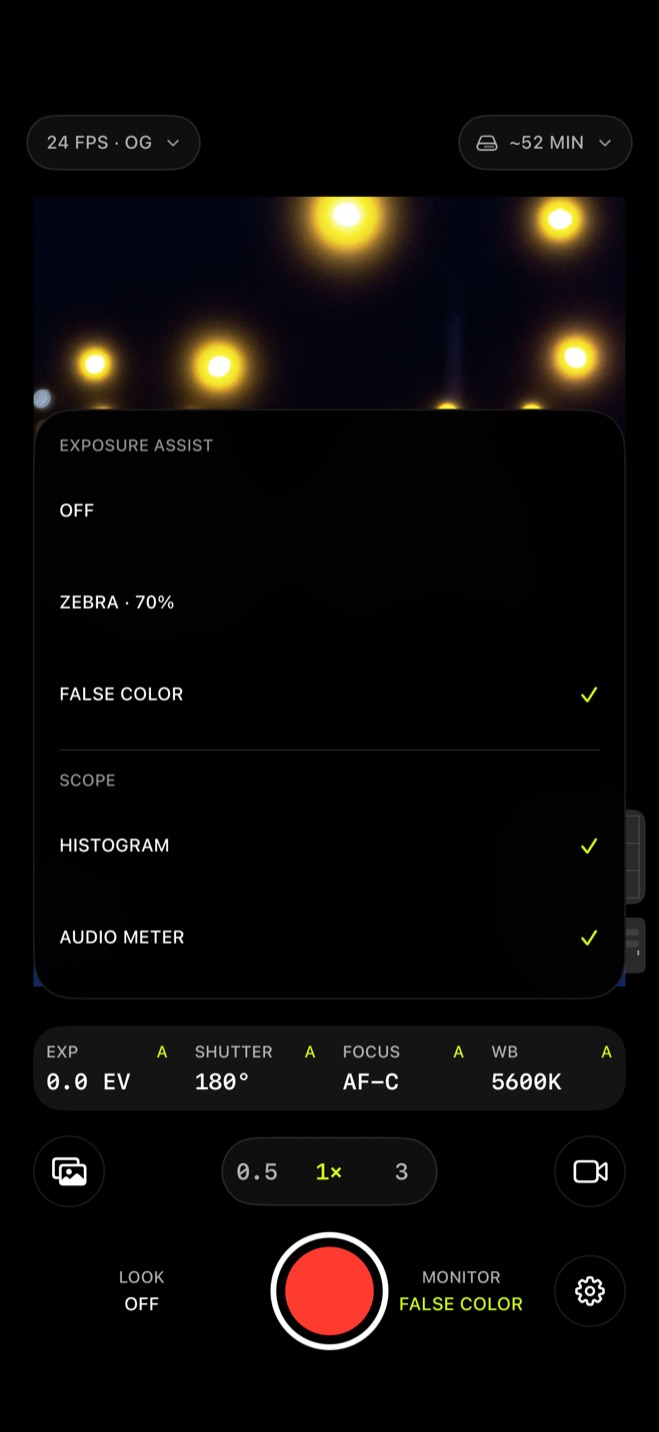
Log Cam reads exposure on the log picture itself. Zebras stripe any area above a threshold you set in IRE, so a highlight shows itself before it clips. False color paints each brightness level in its own color, so you can see where skin and the brightest parts of the frame land. The histogram shows the whole range at once. All three live in the MONITOR menu, under EXPOSURE ASSIST and SCOPE. The shutter readout can also show shutter angle, as a cinema camera does.
The viewfinder has two modes. Std, the default, shows a normal-looking picture like the iPhone's own camera even while the clip records in log. Look shows the flat log picture itself, or the LUT you have loaded. A LUT is a small file that maps the flat log picture to a finished look. With Monitoring only selected, the LUT shows on screen and the clip records in log.
Sound from a Bluetooth, wired or USB microphone
You can record with a Bluetooth, wired or USB microphone instead of the iPhone's own, so dialogue and room tone come from the microphone you would put on a dedicated camera.
To watch levels while you record, turn on AUDIO METER under SCOPE in the MONITOR menu. If a voice peaks or the mic runs quiet, you see it during the take rather than in the edit.
Free for 10 days, then one purchase
The app is free to download, and everything works for 10 days with no credit card and no subscription. After that, a one-time purchase unlocks recording, while the Library, playback and every setting stay free.
Use the 10 days to shoot a clip in the profile that matches your main camera, bring both clips into your editing app, and grade them side by side before you pay anything.
Sources
- 1.Apple Support, “About standard, log, and RAW video,” support.apple.com
- 2.Apple Support, “Set the video format in Final Cut Camera,” support.apple.com
- 3.Apple Support, “Record ProRes video with your iPhone camera,” support.apple.com