Video recording app for iPhone with manual controls, log and RAW
A video recording app for iPhone should put the main camera settings in your hands without making recording hard to learn. Log Cam: RAW 4K Video Camera records log and RAW video with manual ISO, shutter, white balance and focus, saves 4K clips as ProRes or HEVC, and gives you 10 days free before recording requires a one-time purchase.
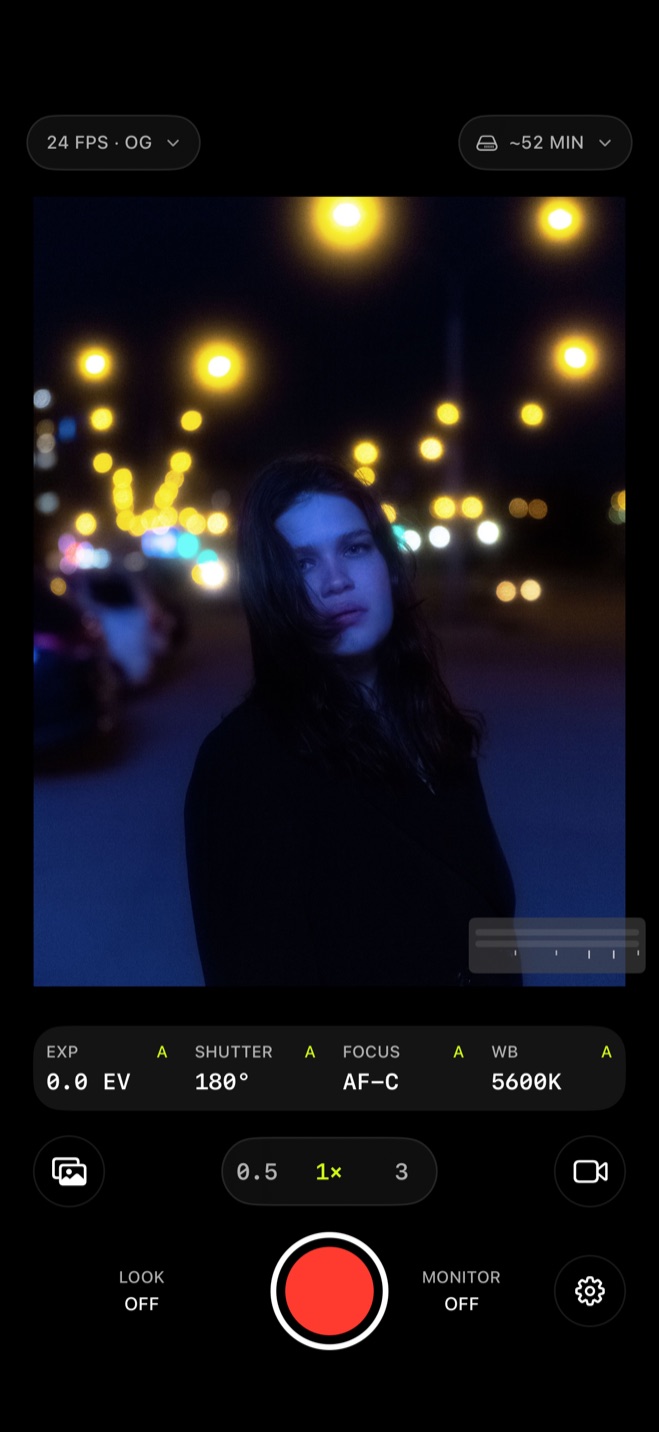
Set exposure and focus before the take
Before you press the record button, the camera screen shows EXP, SHUTTER, FOCUS and WB readouts beside the recording controls. ISO and shutter are the manual exposure controls, white balance is set in Kelvin, and focus can be set for the part of the picture you want sharp.
You do not have to set everything by hand to start recording. Autofocus and tap to focus remain available, while manual ISO, shutter and white balance let you take over individual settings when you want to.
Change focus and exposure while recording
You can change focus, ISO and shutter after the take starts. You can pull focus as a subject moves closer or ride exposure when the light changes without stopping the recording.
Record log and RAW video
Log video uses a logarithmic curve to preserve more dynamic range than standard video, so the picture looks flatter and less saturated because it is meant for color grading later. RAW video retains image information from the camera sensor for more flexibility in post-production.1
Log Cam works from the sensor's RAW data with its own log curves instead of relying only on Apple Log. Under Log curve in Settings, you can choose Apple Log, Apple Log 2, S-Log3, Log C3, V-Log, F-Log or F-Log2.
Choose ProRes or HEVC for the saved file
Clips can be saved at 4K (3840x2160) as ProRes 422 HQ, ProRes 422, ProRes 422 LT, or 10-bit HEVC 4:4:4 or 4:2:0. Bitrate presets run from 30 to 500 Mbps, so you can choose the balance you want between picture quality and storage.
ProRes favors higher quality and less compression and can create larger files, while HEVC is designed for high quality at relatively small file sizes. If storage matters most, HEVC is the smaller-file choice; if you want a ProRes file for editing, pick one of the three ProRes levels.2,3
The camera screen also shows the recording time left, so you can check the remaining time before starting another take.
Try every recording feature for 10 days
Log Cam is free to download, and every feature works for 10 days with no credit card and no subscription. After that, a one-time purchase unlocks recording; the Library, playback and every setting stay free either way.
Sources
- 1.Apple Support, “About standard, log, and RAW video,” support.apple.com
- 2.Apple Support, “Record ProRes video with your iPhone camera,” support.apple.com
- 3.Apple Support, “Set the video format in Final Cut Camera,” support.apple.com